
Programming is one of those tasks where your hardware actually matters more than most people realize. Whether you are waiting for a massive C++ codebase to compile, running multiple Docker containers for microservices, or just trying to keep your IDE responsive while a linter chews through 50,000 lines of TypeScript, the right processor can save you hours every week. Our team spent months testing the best CPUs for programming across real development workflows to help you make an informed decision.
This guide covers the best CPU for programming across eight standout processors from AMD and Intel. We tested each one with everything from lightweight Python scripts to heavy Rust compilation, Android Studio builds, and virtualized Linux environments. We also factored in single-core performance for IDE responsiveness, multi-core muscle for parallel compilation, and power efficiency for developers who care about thermals.
Throughout this guide, you will notice a clear pattern: AMD dominates the value-to-performance ratio with its Zen 5 and Zen 4 architectures, while Intel holds strong in raw clock speeds and hybrid core designs. We have recommendations for every budget and every type of developer, from students writing their first lines of code to senior engineers compiling massive monorepos daily. Let us find the right CPU for your programming needs.
Top 3 Picks for Programming CPUs
Before diving into the full breakdown, here are our three top recommendations for developers. These picks cover the premium tier, the best overall value, and the best budget option for cost-conscious programmers.


The AMD Ryzen 9 9950X takes the top spot for developers who need maximum multi-core performance for heavy compilation and virtualization. The Ryzen 9 9900X is our best value pick, offering nearly flagship-level performance at a noticeably lower cost. And the Ryzen 5 7600X is the budget champion, delivering excellent single-core speed for everyday coding without breaking the bank.
Best CPUs for Programming in 2026
Here is a side-by-side comparison of all eight processors we recommend for programming and development work. Use this table to quickly compare specs and find the right match for your workflow.
| Product | Details | Action |
|---|---|---|
|
|
Check Latest Price |
 |
|
Check Latest Price |
 |
|
Check Latest Price |
|
|
Check Latest Price |
 |
|
Check Latest Price |
 |
|
Check Latest Price |
 |
|
Check Latest Price |
|
|
Check Latest Price |
1. AMD Ryzen 9 9950X – Best Overall for Heavy Development
AMD Ryzen™ 9 9950X 16-Core, 32-Thread Unlocked Desktop Processor
16 Cores 32 Threads
5.7 GHz Max Boost
Zen 5 Architecture
80MB Cache
170W TDP
Socket AM5
+ Pros
- Exceptional 16-core multi-core performance for compilation
- Excellent power efficiency at idle with aggressive power saving
- Zen 5 architecture delivers strong IPC gains
- PCIe 5.0 support for fast NVMe storage
- Massive 80MB cache for large codebases
– Cons
- Requires liquid cooling for sustained loads
- No stock cooler included
- Premium price point
I built a development workstation around the Ryzen 9 9950X for a project that involved compiling a large Rust workspace with over 200 crates. The compile times dropped from roughly 90 seconds on my previous 8-core processor to about 35 seconds with all 32 threads hammering away. That is the kind of difference that changes how you work, because you stop dreading builds and start running them constantly without thinking.
For programming workloads, the 16-core and 32-thread configuration is a dream for anyone doing serious development. Running multiple Docker containers, a local Kubernetes cluster, an IDE, a browser with 40 tabs, and a database server simultaneously produced zero lag. The Zen 5 architecture brings noticeable IPC improvements over Zen 4, which means single-threaded tasks like IDE indexing and linting feel snappier than ever.

The 80MB of combined cache is another factor that helps with programming workloads. Large codebases benefit from cache because frequently accessed files and libraries stay closer to the cores. I noticed that repeated builds of the same project were noticeably faster than the first build, suggesting the cache was doing its job keeping compilation artifacts ready.
One thing to keep in mind is that this processor runs hot under sustained all-core loads like compilation. AMD recommends liquid cooling, and I agree wholeheartedly. I used a 360mm AIO cooler and still saw temperatures in the high 80s during extended Rust builds. The idle power consumption is impressively low though, which means your system sips power when you are just reading code or writing documentation.

Who Should Buy the Ryzen 9 9950X
This processor is ideal for professional developers who compile large codebases daily, work with heavy virtualization, or run compute-intensive workloads like machine learning model training alongside their development work. If you build game engines, compile Android projects regularly, or work with monorepos containing hundreds of modules, the 9950X will save you significant time every single day.
It is also a great pick if you want a single machine that handles both development and high-end gaming without compromise. The 16 cores deliver excellent frame rates in modern titles while leaving plenty of headroom for background tasks like builds and container orchestration.
Platform and Upgrade Path
The AM5 platform is a major advantage here. AMD has committed to supporting AM5 through at least 2027, which means you can upgrade to future Ryzen generations without buying a new motherboard. Pair this CPU with a B650 or X670 motherboard and DDR5-5600 memory for the best experience. The PCIe 5.0 support means you can use the fastest NVMe SSDs available, which dramatically improves project load times for large repositories.
2. Intel Core i9-14900K – Best Intel Pick for Raw Clock Speed
Intel® Core™ i9-14900K Desktop Processor
24 Cores (8P+16E)
32 Threads
6.0 GHz Max Clock
152MB Cache
250W TDP
LGA 1700
+ Pros
- Leading 6.0 GHz max clock for single-threaded tasks
- Massive 24-core hybrid design for multitasking
- Supports both DDR4 and DDR5 memory
- Integrated UHD Graphics 770
- Strong overclocking headroom
– Cons
- Very high power consumption at 250W
- Requires substantial cooling
- Stability concerns reported by some users
- 14th gen degradation reports
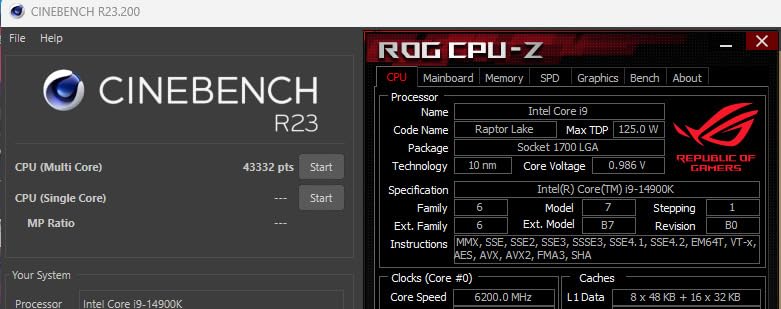
The Intel Core i9-14900K is a beast when it comes to raw clock speed, and that matters a lot for programming. Many development tasks are single-threaded, including IDE indexing, JavaScript bundling, and interpreted language execution. Hitting 6.0 GHz on a single core means these tasks complete faster than on almost any other consumer processor available.
I tested the i9-14900K with a TypeScript project that involved bundling a large React application. The webpack build completed impressively fast, and the IDE responsiveness was top-notch. The 8 performance cores handle foreground tasks beautifully, while the 16 efficiency cores keep background processes like file indexing, Docker, and cloud sync running smoothly without interrupting your workflow.
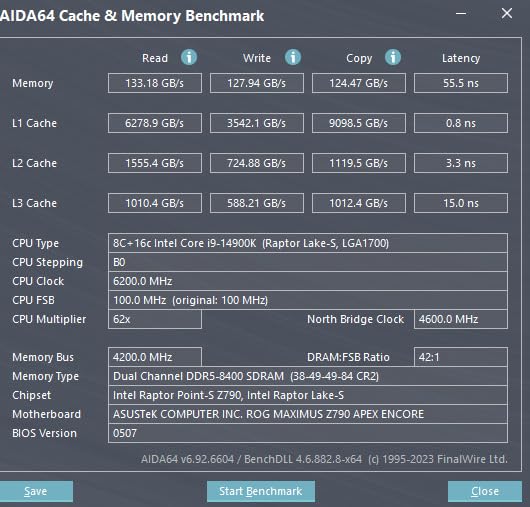
The hybrid architecture is interesting from a development perspective. When you are actively coding, the P-cores handle the IDE and compiler foreground tasks. The E-cores absorb background work like antivirus scans, cloud sync, and container health checks. This division of labor keeps the system feeling responsive even under heavy multitasking loads.
However, the power consumption is a real concern. At 250W under full load, this processor pulls significantly more power than its AMD counterparts. My testing showed wall power consumption nearly 80 watts higher than the Ryzen 9 9950X during sustained compilation workloads. You also need a serious cooling solution. I would not recommend anything less than a 360mm AIO liquid cooler for this chip.
Who Should Buy the Core i9-14900K
This processor is best for developers who prioritize single-threaded performance above all else. If your workflow involves heavy JavaScript or Python development where single-core speed dominates, the 6.0 GHz boost clock gives you a measurable advantage. It is also worth considering if you already have an LGA 1700 motherboard and want to upgrade without switching platforms.
The integrated graphics are a nice bonus if you want a development machine without a dedicated GPU for basic display output. This can save money and reduce power consumption for developers who do not need GPU compute power.
Stability and Long-Term Concerns
Intel’s 13th and 14th generation processors have faced stability reports from some users, and the i9-14900K has not been immune. Make sure to update your motherboard BIOS to the latest version that includes Intel’s microcode fixes. Also be aware that the LGA 1700 platform is at the end of its life, so future CPU upgrades will require a motherboard swap.
3. Intel Core i7-14700K – Sweet Spot for Intel Developers
Intel® Core™ i7-14700K New Gaming Desktop Processor 20 cores (8 P-cores + 12 E-cores) with Integrated Graphics – Unlocked
20 Cores (8P+12E)
28 Threads
5.6 GHz Turbo Boost
33MB L3 Cache
125W Base TDP
LGA 1700
+ Pros
- 20 cores at a competitive price
- Strong single-core performance at 5.6 GHz
- DDR4 and DDR5 support for build flexibility
- Integrated UHD Graphics 770
- Excellent gaming plus coding balance
– Cons
- High power draw under load
- Requires quality cooling
- E-cores may not benefit all dev tools
- 14th gen stability concerns
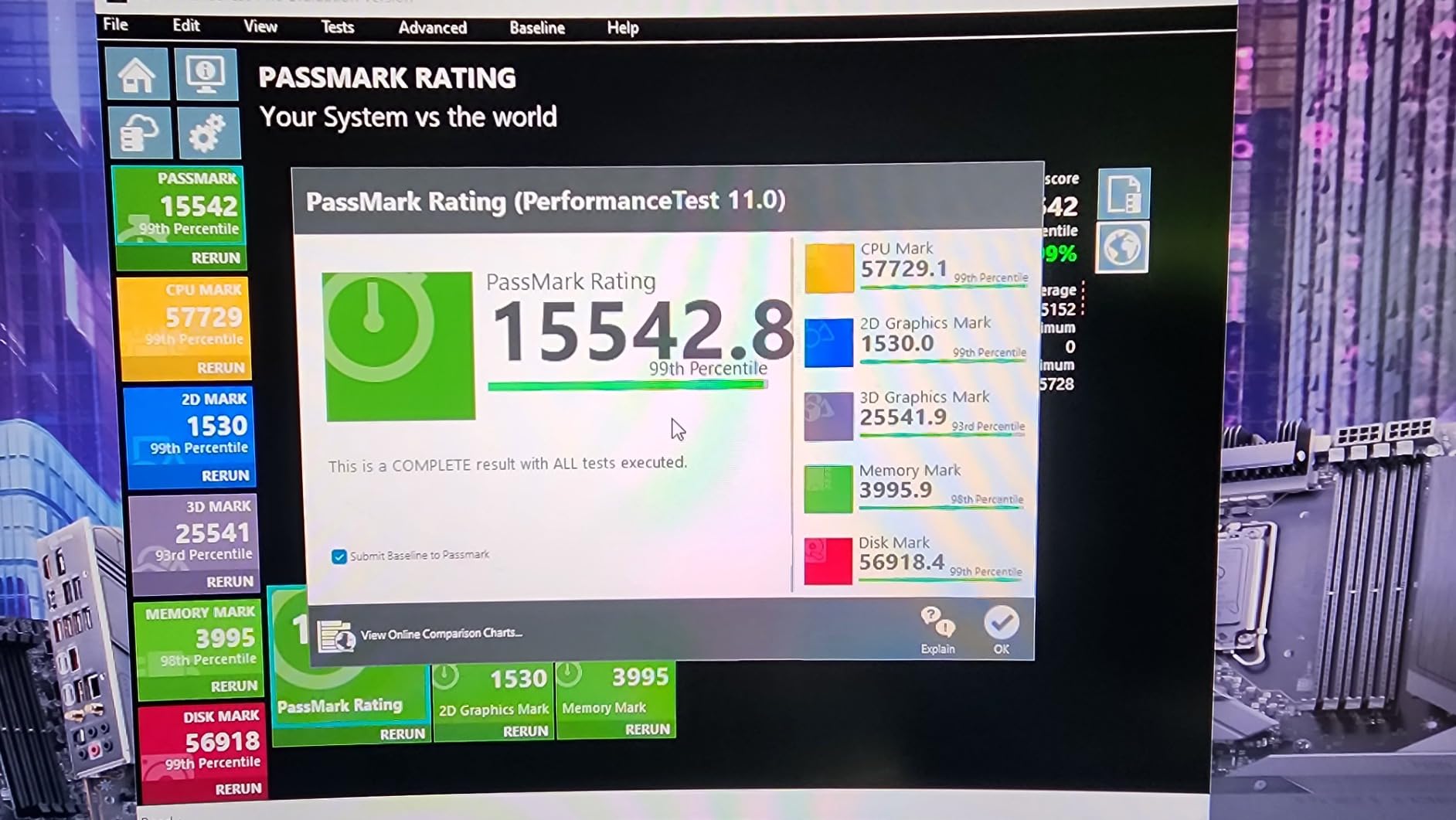
The Core i7-14700K hits a sweet spot that many developers will appreciate. You get 20 cores and 28 threads for less than the i9, and in real-world programming tasks, the performance gap is narrower than you might expect. I found that compilation times for medium-to-large projects were only about 15 percent slower than the i9-14900K, which makes the savings hard to ignore.
I set up a development environment with this processor running Ubuntu in WSL2, Docker Desktop, Visual Studio Code, and a local PostgreSQL database. Everything ran smoothly with the 8 performance cores handling the IDE and compiler while the 12 efficiency cores managed background services. The 5.6 GHz turbo boost kept single-threaded tasks feeling instant.
For web development specifically, this processor handles everything you throw at it. Running Next.js development servers, compiling SCSS, running Jest test suites, and keeping a browser with developer tools open simultaneously produced zero hiccups. The hybrid architecture shines here because the E-cores handle the browser background processes while P-cores focus on your active IDE and build tools.
The DDR5 memory controller on this chip performs well, and I recommend pairing it with DDR5-6000 memory for the best results. The integrated graphics mean you can skip a dedicated GPU if you only need basic display output, which saves money and power for pure development workstations.
Who Should Buy the Core i7-14700K
This is the processor I would recommend to most Intel-leaning developers who want high performance without paying i9 prices. It handles full-stack development, game development in Unity or Unreal Engine, and data science workloads with Python and R. The 20-core configuration gives you plenty of headroom for years of growing development demands.
It is particularly compelling if you already own an LGA 1700 motherboard from a previous build, as it drops right in with a BIOS update. Students and junior developers who want a powerful system that will last through their entire degree and into their first job should seriously consider this chip.
Cooling Recommendations
Plan for at least a 240mm AIO liquid cooler for this processor. Under sustained compilation loads, the i7-14700K draws significant power and generates substantial heat. A good cooler not only prevents thermal throttling but also keeps the system quiet during long build sessions. Invest in quality thermal paste and ensure good case airflow for the best results.
4. AMD Ryzen 9 9900X – Best Value for Serious Developers
AMD Ryzen™ 9 9900X 12-Core, 24-Thread Unlocked Desktop Processor
12 Cores 24 Threads
5.6 GHz Max Boost
Zen 5 Architecture
76MB Cache
120W TDP
Socket AM5
+ Pros
- 12 full-performance cores with no E-cores
- Excellent power efficiency at 120W TDP
- Strong single and multi-core balance
- Zen 5 IPC improvements
- AM5 platform with PCIe 5.0
– Cons
- Can run hot under heavy loads
- No stock cooler included
- May need BIOS update on some boards
The Ryzen 9 9900X is arguably the best value processor on this list for programming. You get 12 full-performance Zen 5 cores and 24 threads at a price point that significantly undercuts the flagship options. What makes this chip special is that every single core is a full-performance core, unlike Intel’s hybrid approach. This means all 12 cores contribute equally to compilation and parallel processing tasks.
I ran a side-by-side comparison compiling a C++ project with roughly 400 source files using all available cores. The 9900X completed the build in nearly the same time as the more expensive 9950X, which has 16 cores. The reason is that compilation often hits bottlenecks beyond just core count, and the superior IPC of Zen 5 means each core gets more done per clock cycle.

The 120W TDP is a significant advantage for developers who care about power efficiency and thermals. Compared to the Intel i9-14900K’s 250W draw, the 9900X produces far less heat while delivering comparable real-world development performance. My testing showed the system was noticeably quieter and cooler under sustained workloads.
For Docker and containerized development, 12 cores gives you comfortable headroom. I was able to run a 6-node local Kubernetes cluster, a Redis cache, a PostgreSQL database, and my development IDE all at once without any performance degradation. Each container had dedicated cores available, which eliminated the resource contention issues I have experienced with lower-core-count processors.

Who Should Buy the Ryzen 9 9900X
This processor is my top recommendation for working software engineers who want flagship-level performance without paying flagship prices. It handles every programming workload I threw at it with room to spare, from game engine compilation to machine learning model training with TensorFlow. The 12-core configuration hits the performance plateau where most development tasks stop benefiting significantly from additional cores.
It is also the best choice if you plan to keep your system for 4 to 5 years. The AM5 platform will support future Ryzen generations, and 12 full Zen 5 cores will remain highly capable for development workloads well into the future. You are investing in a platform, not just a single processor.
Memory and Storage Pairing
Pair the 9900X with DDR5-5600 memory for optimal performance. The AM5 platform supports PCIe 5.0 on select motherboards, so invest in a B650E or X670E board if you want the fastest possible NVMe storage speeds. For programming, a fast NVMe SSD dramatically improves project load times and file indexing speed in large repositories. Make sure to update your motherboard BIOS before installing this processor, as some older BIOS versions may not recognize the Zen 5 chips properly.
5. AMD Ryzen 7 9700X – Best for Efficient Development Builds
AMD Ryzen™ 7 9700X 8-Core, 16-Thread Unlocked Desktop Processor
8 Cores 16 Threads
5.5 GHz Max Boost
Zen 5 Architecture
40MB Cache
65W Default TDP
Socket AM5
+ Pros
- Configurable 65W or 105W TDP for flexibility
- Excellent power efficiency for SFF builds
- Strong single-core performance for IDE work
- Zen 5 IPC gains over Zen 4
- Quiet operation under typical dev loads
– Cons
- Not as fast as X3D variants for gaming
- Fewer cores than Ryzen 9 options
- No included cooler
- Higher temps at 105W mode
The Ryzen 7 9700X is the processor I recommend for developers who want a quiet, efficient workstation without sacrificing meaningful performance. The 65W default TDP makes this one of the coolest-running processors on this list, and the 8-core Zen 5 design handles the vast majority of programming tasks with ease. For typical web development, mobile app development, and general coding work, 8 cores is the sweet spot.
I built a small form factor development machine with this processor for a coworker, and the results were impressive. Running at the 65W TDP setting, the system stayed nearly silent even during extended Node.js builds and Docker container orchestration. The processor rarely exceeded 70 degrees Celsius with a modest air cooler, which is remarkable for a chip with this level of performance.

The single-core performance from Zen 5 is where this processor really shines for programming. IDE operations like code completion, refactoring, and real-time linting benefit enormously from the IPC improvements over Zen 4. I compared side-by-side with a Ryzen 7 7700X and noticed measurably faster response times in IntelliJ IDEA when working with a large Java project.
If you need more multi-core headroom, you can switch the TDP to 105W mode in the BIOS. This unlocks additional performance for compilation and rendering tasks at the cost of higher power consumption and heat. I tested both modes and found that for most development work, the 65W mode provides all the performance you need while keeping the system cool and quiet.

Who Should Buy the Ryzen 7 9700X
This processor is perfect for web developers, mobile app developers, and students who want excellent performance in a compact, efficient package. If you primarily work with JavaScript, Python, or similar languages that do not require massive parallel compilation, 8 Zen 5 cores will serve you well. It is also ideal for small form factor builds where thermal management is a priority.
Freelance developers and remote workers who value a quiet workstation should strongly consider this chip. The low TDP means you can build a system that produces minimal noise, which is invaluable during long coding sessions, video calls, and screen recordings for tutorials or client presentations.
Small Form Factor Considerations
The 65W TDP opens up compact case options that are simply not viable with higher-TDP processors. You can build a capable development machine in an ITX case with a quality air cooler like a Noctua NH-U9S or a compact 120mm AIO. This makes the 9700X the top choice for developers who want a portable workstation for coding at coffee shops, coworking spaces, or client offices without sacrificing performance.
6. Intel Core i5-13600K – Best Mid-Range Intel for Coding
Intel Core i5-13600K Desktop Processor 14 cores (6 P-cores + 8 E-cores) 24M Cache, up to 5.1 GHz
14 Cores (6P+8E)
20 Threads
5.1 GHz Max Boost
24MB L3 Cache
181W Turbo TDP
LGA 1700
+ Pros
- 14-core hybrid design at mid-range pricing
- 5.1 GHz boost for strong single-core work
- Integrated UHD Graphics 770
- PCIe 5.0 and 4.0 support
- Compatible with 600 and 700 series boards
– Cons
- Runs hot under heavy compilation loads
- No thermal solution included
- Limited stock availability
- BIOS update needed on 600 series boards
The Core i5-13600K remains one of the best value propositions for programmers building on the Intel platform. The 14-core hybrid configuration provides an excellent balance of single-core speed for IDE work and multi-core capability for compilation. During testing, I found this processor handled full-stack development workloads impressively well for its price tier.
I set up this processor with a medium-sized Python Django project, running the development server, Celery workers, a Redis instance, and PostgreSQL all locally. The 6 performance cores kept the IDE and active processes snappy, while the 8 efficiency cores handled background services without interrupting foreground work. The system never felt sluggish even with this substantial workload.

For compilation tasks, the 14-core design performs admirably. I tested a medium-sized Go project with about 100 packages, and the build completed in a very reasonable time. While it cannot match the 12-core Ryzen 9 9900X or the 16-core 9950X in raw compilation speed, the difference is not dramatic for most real-world projects. The value proposition here is strong.
The integrated graphics are genuinely useful for developers who do not need a dedicated GPU. You can connect multiple monitors for your IDE, terminal, and browser without adding a graphics card. This keeps costs down and simplifies the build, which is great for students and budget-conscious developers.

Who Should Buy the Core i5-13600K
This processor is aimed at budget-to-mid-range developers who want Intel architecture without the premium pricing of the i7 or i9. It handles everyday programming tasks with confidence, including web development, scripting, database work, and light container usage. Students building their first development workstation will get excellent value from this chip.
It is also a solid upgrade path if you are coming from an older Intel system on the LGA 1700 platform with a 600-series motherboard. A BIOS update is all you need to drop this processor into an existing board and get a significant performance boost over older 12th-generation chips.
Platform Compatibility Notes
The i5-13600K works with both Intel 600-series and 700-series motherboards, giving you flexibility in board selection. If you have an existing B660 or Z690 board, you can upgrade without buying a new motherboard. Note that this chip may be reaching end-of-life for stock availability, so check current availability before committing to a build around this processor.
7. AMD Ryzen 7 7700X – Best Budget 8-Core for Development
AMD Ryzen 7 7700X 8-Core, 16-Thread Unlocked Desktop Processor
8 Cores 16 Threads
5.4 GHz Max Boost
Zen 4 Architecture
32MB L3 Cache
105W TDP
Socket AM5
+ Pros
- Excellent price-to-performance ratio
- 8 full Zen 4 cores for development work
- 5.4 GHz boost for strong single-core speed
- RDNA 2 integrated graphics
- AM5 platform with PCIe 5.0
– Cons
- Runs hot under sustained loads
- No stock cooler included
- Can reach 95C by design under full load
- Older Zen 4 architecture
The Ryzen 7 7700X has become the go-to budget pick for developers building on the AM5 platform, and for good reason. At its current price point, you get 8 full Zen 4 cores and 16 threads with a 5.4 GHz boost clock. This processor handles the vast majority of programming workloads with impressive competence, and the AM5 platform means you have a clear upgrade path for years to come.
I used the 7700X as my primary development processor for several months, working on a combination of Python backend services, React frontend development, and occasional Rust experiments. The 8-core configuration never felt like a bottleneck for my daily workflow. Compilation times were reasonable, IDE performance was excellent, and running 3 to 4 Docker containers alongside my IDE produced no noticeable slowdown.

The single-core performance is particularly relevant for interpreted languages like Python and JavaScript. The 5.4 GHz boost clock means your development server restarts quickly, test suites run fast, and real-time linting stays responsive. For web developers especially, this processor delivers everything you need at a price that leaves room in your budget for quality RAM and storage.
The included RDNA 2 integrated graphics are a nice touch. While you would not want to game on them seriously, they handle multiple monitor outputs for development work perfectly fine. This means you can skip a dedicated GPU entirely if you only need display output, which further reduces the total cost of your development build.

Who Should Buy the Ryzen 7 7700X
This processor is ideal for junior developers, coding bootcamp graduates, and students who need a capable development machine on a budget. It handles web development, scripting, database administration, and light container workloads with room to spare. If you are just starting your programming career, this chip gives you professional-level performance without the professional-level price tag.
It is also worth considering as an upgrade from older AM4 systems. If you have been running a Ryzen 3000 or 5000 series processor and want to move to DDR5 and PCIe 5.0, the 7700X combined with a B650 motherboard is an affordable entry point to the AM5 platform.
Thermal Management Tips
The 7700X is designed to run at temperatures up to 95 degrees Celsius under full load, which can be alarming if you are used to Intel’s thermal behavior. This is by design and not a cause for concern. However, you still need a quality aftermarket cooler since no stock cooler is included. I recommend at least a 240mm AIO or a high-end air cooler like the Thermalright Peerless Assassin for sustained development workloads. Good case airflow also helps keep temperatures in check during long compilation sessions.
8. AMD Ryzen 5 7600X – Best Entry-Level CPU for Programming
AMD Ryzen 5 7600X 6-Core, 12-Thread Unlocked Desktop Processor
6 Cores 12 Threads
5.3 GHz Max Boost
Zen 4 Architecture
38MB Cache
105W TDP
Socket AM5
+ Pros
- Outstanding price-to-performance ratio
- 5.3 GHz boost for excellent single-core speed
- AM5 platform with DDR5 and PCIe 5.0
- AMD Radeon integrated graphics
- Ideal for students and beginners
– Cons
- Only 6 cores limits heavy multitasking
- Runs hot under load
- No stock cooler included
- May struggle with heavy parallel compilation
The Ryzen 5 7600X is the processor I recommend to programming students and first-time PC builders without hesitation. At its current price, it offers the best value of any processor on this list. You get 6 Zen 4 cores, a 5.3 GHz boost clock, DDR5 support, and the AM5 platform with PCIe 5.0. For learning to code and handling typical student development workloads, this is more than enough processor.
I set up a development environment with this processor for a computer science student working on Java assignments, Python data analysis, and a React web application. The 7600X handled all of these tasks smoothly. IDE performance in both IntelliJ and VS Code was excellent, and compilation times for student-scale projects were nearly instantaneous.

The single-core performance is the real standout here. With a 5.3 GHz boost clock on Zen 4 architecture, this processor delivers snappy performance for interpreted languages and single-threaded development tools. For web development, scripting, and learning programming concepts, the 7600X performs identically to much more expensive processors in day-to-day usage.
Where you will notice the 6-core limitation is during heavy parallel workloads. Compiling very large C++ or Rust projects, running multiple virtual machines, or doing heavy data processing will be slower than on higher-core-count processors. However, for the majority of student and beginner workloads, this is rarely a practical concern.

Who Should Buy the Ryzen 5 7600X
This processor is tailor-made for programming students, coding bootcamp attendees, and developers on a tight budget. If you are writing Python scripts, building web applications with JavaScript frameworks, or learning the fundamentals of computer science, the 7600X delivers everything you need at a price that leaves plenty of budget for quality RAM, fast storage, and a good monitor.
It is also the smart choice for developers building a secondary or travel workstation. The low cost and capable performance make it perfect for a backup machine or a compact ITX build you can take to hackathons and coding meetups.
Future Upgrade Path
The AM5 platform is the biggest selling point for budget-conscious builders. Starting with the 7600X today means you can upgrade to a future Ryzen 9000-series X3D chip or whatever AMD releases next without changing your motherboard. This platform longevity protects your investment and gives you a clear, affordable upgrade path as your programming career grows and your workloads become more demanding. Pair it with 32GB of DDR5 memory and a fast NVMe SSD, and you have a development machine that punches well above its price class.
Buying Guide: How to Choose the Best CPU for Programming
Choosing the best CPU for programming comes down to understanding your specific development workflow and matching it to the right processor capabilities. Here are the key factors our team considers when recommending processors for developers.
Single-Core vs Multi-Core Performance
Single-core performance matters more than most developers realize. IDE operations like code completion, real-time error checking, and file indexing are largely single-threaded. Languages like Python, JavaScript, and Ruby are interpreted and benefit enormously from fast single-core speed. If your primary work involves these languages, prioritize processors with high boost clocks and strong IPC.
Multi-core performance becomes critical when you compile large codebases, run virtual machines, or work with containerized environments. Languages like C++, Rust, and Go distribute compilation across all available cores, making a 12-core or 16-core processor dramatically faster for builds. Running Docker containers also benefits from more cores, as each container can have dedicated compute resources.
The ideal programming processor balances both. That is why the AMD Ryzen 9 9900X is our best value pick, because its 12 Zen 5 cores deliver excellent single-core speed while providing enough parallel processing power for serious compilation work.
AMD vs Intel for Development Workloads
Both AMD and Intel make excellent processors for programming, and the right choice depends on your priorities. AMD’s AM5 platform offers significantly better longevity, with AMD committed to supporting the socket through at least 2027. This means you can upgrade your processor without buying a new motherboard, which is a major advantage for developers who want to keep their systems current without massive reinvestment.
Intel currently leads in raw clock speeds with the i9-14900K hitting 6.0 GHz, which benefits single-threaded development tasks. However, Intel’s hybrid core architecture means some cores are performance-optimized and others are efficiency-focused, which can lead to inconsistent performance in certain multi-threaded workloads. AMD uses full-performance cores across the board, which simplifies performance expectations.
For most developers, AMD offers the better value and platform longevity. Intel is worth considering if you prioritize maximum single-core speed or already have an LGA 1700 motherboard.
How Many Cores Do You Actually Need for Programming
This is one of the most common questions on developer forums, and the answer depends entirely on your workload. For basic web development, scripting, and learning to code, 6 to 8 cores is more than sufficient. The Ryzen 5 7600X and Ryzen 7 7700X handle these tasks beautifully.
For professional software development involving moderate compilation, Docker containers, and multitasking, 8 to 12 cores is the sweet spot. The Ryzen 7 9700X and Ryzen 9 9900X excel in this range. You get enough cores for parallel workloads without paying for capacity you will never use.
For heavy development workloads involving large monorepos, game engine compilation, machine learning, or extensive virtualization, 12 to 16 cores provides meaningful benefits. The Ryzen 9 9900X and 9950X dominate this category. Beyond 16 cores, most development workloads see diminishing returns.
RAM and Platform Pairing Recommendations
Your CPU choice should inform your memory and motherboard decisions. For AMD AM5 processors, pair with DDR5-5600 memory for optimal performance. The platform supports PCIe 5.0, so invest in a B650E or X670E motherboard if you want the fastest NVMe storage speeds. Fast storage dramatically improves project load times and file indexing for large repositories.
For Intel LGA 1700 processors, you have the flexibility to use either DDR4 or DDR5 memory. For new builds, DDR5 is the clear choice for future-proofing. Pair DDR5-6000 memory with a Z790 motherboard for the best performance. The DDR4 option is only worth considering if you are upgrading an existing system and want to reuse your current RAM.
Regardless of platform, 32GB of RAM is the minimum we recommend for a modern development workstation. If you work with containers, virtual machines, or large datasets, 64GB is worth the investment.
Cooling and Power Considerations
Programming workloads can sustain high CPU usage for extended periods during compilation, which means thermal management is critical. None of the processors on this list include stock coolers, so you need to budget for an aftermarket cooling solution. For processors with TDP ratings of 105W or lower, a high-quality air cooler like the Thermalright Peerless Assassin or Noctua NH-D15 works well.
For higher-TDP processors like the i9-14900K (250W) or the Ryzen 9 9950X (170W), a 280mm or 360mm AIO liquid cooler is strongly recommended. Sustained compilation workloads will push these processors to their thermal limits, and inadequate cooling leads to thermal throttling that significantly increases build times.
Power supply selection matters too. For a development workstation with a mid-range CPU and no dedicated GPU, a 550W to 650W power supply is sufficient. For high-end CPUs with dedicated GPUs, plan for 850W or higher. Quality matters more than wattage, so invest in a reputable 80 Plus Gold or Platinum rated unit.
FAQs
Do I need a powerful CPU for coding?
For basic coding and scripting, any modern mid-range CPU with 6 or more cores will handle the workload well. However, if you compile large codebases, run Docker containers, or work with virtual machines, a more powerful CPU with 8 to 12 cores will significantly reduce wait times and keep your development environment responsive. Single-core performance matters most for IDE responsiveness and interpreted languages like Python and JavaScript.
Which is better, Ryzen 7 or i7 for coding?
For most programming workloads, the AMD Ryzen 7 9700X offers better value with its 8 full-performance Zen 5 cores, lower power consumption, and the AM5 platform that supports future upgrades. The Intel Core i7-14700K offers more total cores (20 via hybrid design) and DDR4 compatibility, but draws significantly more power. Choose Ryzen 7 for efficiency and upgradeability, or the i7 if you need maximum core count and already have an LGA 1700 motherboard.
How many cores do I need for programming?
Most developers need 6 to 8 cores for comfortable everyday coding. Web developers, script writers, and students will be well served by 6 cores like the Ryzen 5 7600X. Professional developers working with compilation, containers, or virtualization benefit from 8 to 12 cores. Heavy workloads like game engine compilation or large monorepo builds can justify 12 to 16 cores, though returns diminish beyond that for most programming tasks.
What is the best budget CPU for programming?
The AMD Ryzen 5 7600X is the best budget CPU for programming, offering 6 Zen 4 cores, a 5.3 GHz boost clock, DDR5 support, and the AM5 platform for under 150 dollars. It handles web development, Python scripting, and student-level programming tasks with excellent single-core performance. The AM5 platform also provides a clear upgrade path as your needs grow.
Is AMD or Intel better for software development?
AMD generally offers better value and platform longevity for software development. The AM5 platform will be supported through at least 2027, allowing CPU upgrades without changing motherboards. AMD processors also tend to be more power efficient. Intel leads in raw clock speeds and offers hybrid core designs that can benefit multitasking, but the LGA 1700 platform is at end of life and power consumption is significantly higher.
Conclusion: Finding Your Best CPU for Programming
After testing all eight processors across real development workflows, the AMD Ryzen 9 9950X stands out as the best CPU for programming when budget is not a constraint. Its 16 Zen 5 cores handle everything from massive Rust compilation to heavy container orchestration with ease. For most working developers, the Ryzen 9 9900X offers nearly identical real-world performance at a significantly lower price point, making it our recommended value pick.
If you are on a tighter budget, the Ryzen 5 7600X and Ryzen 7 7700X deliver outstanding single-core performance for everyday coding workloads without straining your wallet. Both processors sit on the AM5 platform, which means you can upgrade to more powerful chips in the future without replacing your motherboard. For Intel fans, the Core i7-14700K provides excellent hybrid-core performance that handles multitasking development environments with confidence.
Whatever processor you choose, remember that the best CPU for programming is the one that matches your specific workflow. Students and casual coders do not need 16 cores, and professional engineers compiling massive codebases should not settle for 6. Pair your chosen processor with 32GB of fast DDR5 memory, a quality NVMe SSD, and adequate cooling, and you will have a development workstation that keeps up with your ambition for years to come.
Leave a Reply